Apple Vision Pro Review: Is This the Future of Mixed Reality?
Introduction
Apple has finally stepped into the mixed reality world with the Apple Vision Pro, a premium AR/VR headset that promises to revolutionize how we interact with digital content. With a price tag of $3,499, it's the most expensive consumer headset to date—but is it worth the investment?
In this review, we’ll dive into the design, features, performance, battery life, and real-world usability to determine if this is truly the future of spatial computing.
Unboxing & First Impressions
Opening the Apple Vision Pro box is like unveiling a piece of the future. Inside, you get:
- The Vision Pro headset itself
- An external battery pack
- A USB-C cable & adapter
- Light seal and headbands for comfort
- Zeiss optical inserts (if you need prescription lenses)
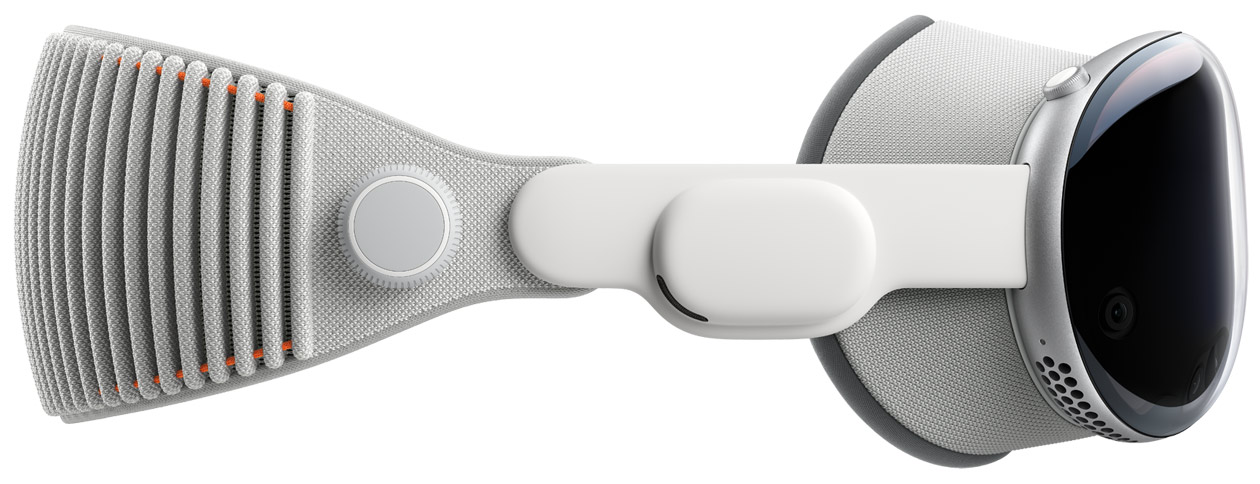
Holding the Vision Pro for the first time, it’s clear that Apple hasn’t cut corners. The device has a premium glass front, an aluminum frame, and a soft fabric lining for comfort. It definitely looks and feels like a luxury gadget.
Display & Visual Quality – The Best in the Market?
Apple has equipped the Vision Pro with dual 4K Micro-OLED displays, delivering an unmatched resolution of 23 million pixels. That’s more pixels than a 4K TV for each eye!
What This Means for Users:
✅ Crisp, lifelike visuals – No pixelation, making text and videos look incredibly sharp.
✅ Incredible colors & contrast – Thanks to OLED technology, blacks are true black, and colors pop.
✅ Large virtual screens – You can project multiple apps in a giant floating workspace.
✅ Smooth 90Hz refresh rate – Ensures fluid animations with minimal lag.
🎬 Movie lovers will love the ability to watch films in a virtual IMAX-style environment, while professionals can expand their MacBook display into a massive workspace.
User Experience – Eye & Hand Tracking Like Never Before
Unlike Meta Quest or other VR headsets, Vision Pro doesn’t require controllers. Instead, it relies entirely on eye-tracking, hand gestures, and voice control.
👀 Eye Tracking:
- Just look at an app or menu, and it highlights automatically.
- A simple tap of your fingers selects it, eliminating the need for controllers.
🖐 Hand Gestures:
- Pinch to select, swipe to scroll, and zoom with finger movements.
- Works seamlessly, even in low light conditions.
🎙 Voice Control:
- Speak to Siri to open apps or dictate text messages.
- Hands-free control for a futuristic experience.
This hands-free navigation makes using Vision Pro effortless and intuitive—a huge step toward natural, controller-free interaction in mixed reality.
Performance – Powered by M2 & R1 Chips
Under the hood, Vision Pro runs on a powerful dual-chip setup:
- M2 Chip (same as in MacBooks) – Handles visionOS, app processing, and multitasking.
- R1 Chip – Processes input from 12 cameras, 5 sensors, and 6 microphones to eliminate motion lag.
Real-World Performance:
🚀 Zero lag – Scrolling, opening apps, and switching between windows feel instant.
🎮 Casual gaming works well – Although not designed for hardcore gaming, it supports Apple Arcade games.
🖥 Mac Integration – You can use Vision Pro as a wireless Mac display, extending your screen into virtual space.
However, performance comes at a cost—the device heats up slightly after prolonged use, but not to an uncomfortable level.
Battery Life – The Biggest Drawback?
🔋 Vision Pro does not have a built-in battery. Instead, it relies on an external battery pack connected via a cable.
Battery Performance:
- 2 hours of use per charge 🔋
- External battery must be clipped to your pocket
- Plugging into a power source allows all-day use
While this is fine for short sessions, it’s a major limitation for extended use, especially if you’re traveling or watching long movies.
Comfort & Fit – Is It Heavy?
At 600-650 grams, Vision Pro is heavier than Meta Quest 3 and may cause slight discomfort after an hour or more of use. However, Apple has included:
✅ Adjustable head straps for better weight distribution.
✅ Soft padding around the eyes for comfort.
✅ Customizable light seal to block out distractions.
While comfortable for short sessions, long use may strain your neck—a problem Apple may need to address in future versions.
Pros & Cons
✅ Pros:
✔ Best display in any AR/VR headset (4K Micro-OLED)
✔ Super-intuitive controls (eye & hand tracking)
✔ Seamless Apple ecosystem integration
✔ No controllers required
✔ Premium build quality
❌ Cons:
❌ Expensive ($3,499) – Not for casual users
❌ Short battery life (2 hours)
❌ Heavy for long-term use
❌ Limited gaming library compared to Meta Quest
Final Verdict – Should You Buy It?
⭐ Rating: 8.5/10
The Apple Vision Pro is an engineering masterpiece that offers the best display, performance, and eye-tracking technology in the market. It’s perfect for:
✅ Tech enthusiasts & Apple fans who want cutting-edge innovation.
✅ Professionals looking for a futuristic productivity tool.
✅ Movie lovers who want an immersive cinema experience.
However, due to its high price, limited battery life, and lack of gaming support, it may not yet be the best choice for everyone. If you’re looking for affordable AR/VR, Meta Quest 3 is a better option for now.
Would you pay $3,499 for the Apple Vision Pro? Let us know in the comments below!
Stay Tuned for More Reviews!
🔥 Follow Tech-Guru101 for in-depth tech reviews, comparisons, and the latest gadgets!
Comments
Post a Comment