Meta Quest 3 Review: The Best VR Headset for the Price?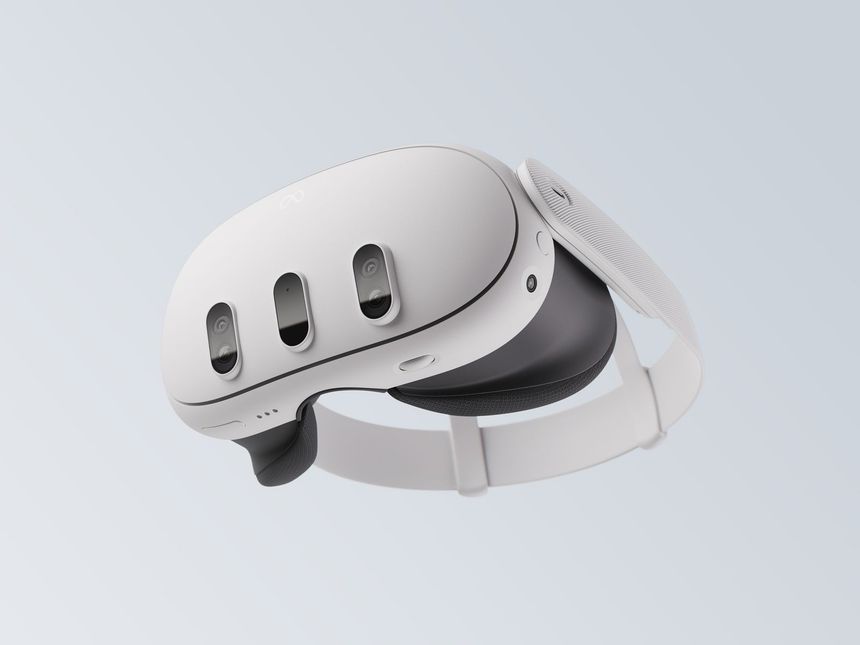
Introduction
The Meta Quest 3 is the latest installment in Meta’s VR headset lineup, and it aims to bring mixed reality to the masses. With a price tag of $499, it’s a far cry from the $3,499 Apple Vision Pro. But is it a better value? In this review, we’ll explore the features, performance, design, and how it compares to its more expensive competitors.
Unboxing & First Impressions
Opening the Meta Quest 3 box feels like you’re unboxing the future. Inside, you’ll find:
- The Meta Quest 3 headset
- Two controllers (Touch Pro controllers)
- A charging cable & adapter
- Silicone face gasket for comfort
The sleek design of the Quest 3 is a major step up from its predecessor, with a lightweight frame, improved lens, and sleeker front panel. Compared to other VR headsets, this is one of the most ergonomic devices available today.
Display & Visual Quality – Impressive for the Price
One of the key selling points of the Meta Quest 3 is its impressive visual upgrades compared to the Quest 2. It features a 2064 x 2208 resolution per eye, making it ideal for both VR gaming and mixed-reality experiences.
Key Visual Features:
- Crystal-clear clarity – Games, apps, and movies look sharp and vibrant.
- High refresh rate (up to 120Hz) – Smooth animations for an immersive experience.
- Mixed Reality (MR) Support – Through Passthrough+, the Quest 3 offers real-world interaction while blending it with VR elements.
While it doesn't have the insane pixel count of the Apple Vision Pro, the Quest 3’s visuals are more than adequate for casual gamers and VR enthusiasts.
User Experience – Comfortable and Easy to Use
Unlike the Apple Vision Pro, which relies on eye tracking and hand gestures, the Meta Quest 3 sticks with the tried-and-true controller system. The new Touch Pro controllers have improved haptic feedback, adaptive triggers, and finger tracking, providing a much more immersive experience than previous models.
Key Features:
- Controllers – Intuitive, with improved ergonomics and better hand tracking.
- Passthrough+ – Provides real-time mixed-reality experiences, allowing users to interact with their environment while in VR.
- Room-Scale VR – Seamlessly transitions from sitting to standing, and even walking around.
- Quick Setup – Set up your play area in minutes with boundary settings.
The Quest 3 is easy to use right out of the box, making it an excellent choice for both beginners and advanced users.
Performance – Fast & Smooth Gaming
Powered by the Qualcomm Snapdragon XR2 Gen 2 chip, the Meta Quest 3 handles both VR gaming and mixed-reality experiences effortlessly. It offers super-fast performance, allowing for high-quality, low-latency interactions.
Key Benefits:
- Smooth VR gaming – Games like Beat Saber, Half-Life: Alyx, and Moss look amazing and run without any noticeable lag.
- Mixed-reality gaming – The Passthrough+ feature is a game-changer, allowing for seamless integration of the real world with the VR environment.
- Battery Life – Approximately 2-3 hours of active use, which is on par with most headsets in this price range.
While not as powerful as the Apple Vision Pro, the Meta Quest 3 delivers more than enough for the average user, especially in terms of gaming.
Comfort & Fit – Lightweight Design
The Meta Quest 3 is designed to be worn for extended periods without causing discomfort. It’s lighter than many VR headsets, weighing just 515 grams, which is crucial for long gaming sessions.
Comfort Features:
- Adjustable head strap – Ensures a secure, comfortable fit.
- Facial interface – Soft padding that prevents discomfort during extended play.
- Lightweight frame – You can easily wear the Quest 3 for long periods without feeling fatigued.
The Quest 3 is ideal for gamers who spend hours in virtual reality. While it’s not as premium-feeling as the Apple Vision Pro, the lightweight design makes it an excellent option for comfort.
Pros & Cons
✅ Pros:
✔ Affordable ($499) – A fraction of the price of high-end headsets like the Vision Pro.
✔ Impressive display with 2064 x 2208 resolution.
✔ Passthrough+ mixed reality support.
✔ Improved controllers with haptic feedback and finger tracking.
✔ Quick and easy setup.
✔ Lightweight and comfortable for long gaming sessions.
❌ Cons:
❌ Lacks the high-end features of more expensive headsets (e.g., Apple Vision Pro’s eye tracking and premium displays).
❌ Limited battery life (2-3 hours of active use).
❌ No integrated prescription lens option (you’ll need aftermarket solutions).
Final Verdict – Is It Worth the $499?
⭐ Rating: 9/10
The Meta Quest 3 is a fantastic VR headset for anyone looking to get into the world of mixed reality without breaking the bank. It’s perfect for:
✅ Casual gamers who want to enjoy immersive experiences at a reasonable price.
✅ VR enthusiasts who enjoy a seamless transition between virtual and real worlds.
✅ First-time VR buyers looking for an easy setup and great performance.
However, if you're looking for the cutting-edge experience that the Apple Vision Pro offers, then the Quest 3 might feel a bit limited.
For $499, it’s hard to beat the Meta Quest 3’s value in terms of VR gaming, mixed-reality experiences, and ease of use. It’s an excellent headset for the average consumer and anyone on a budget who still wants an immersive VR experience.
Want More Reviews?
Stay tuned to Tech-Guru101 for more in-depth tech reviews, comparisons, and guides to help you choose the best gadgets on the market! 🚀
SEO Tips for Blogger Post
- Use the keywords Meta Quest 3, best VR headset, and mixed reality in your title and throughout the post.
- Add relevant tags such as VR, technology, and gaming headset to increase discoverability.
- Link back to your Apple Vision Pro review in a comparison section for better cross-linking on your blog.
Comments
Post a Comment